Paint — Drag & Freehand

Best for: free-form directional gradients — draw the flow by hand.
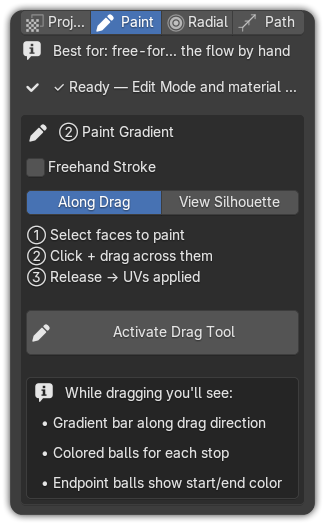
Paint lets you lay a gradient in any direction you like, either by dragging a straight line or by drawing a freehand stroke. A live ribbon preview follows your cursor the whole time.
Drag (straight gradient)
The default mode. Click and drag a line; the gradient runs along it.
- Edit Mode (Tab) → select the faces to paint.
- UV Tools ▸ Paint tab → pick a Target strip.
- Click Activate Drag Tool.
- Click + drag across the faces to set the gradient's start, end and direction.
- Release → the UVs are applied.
While dragging you'll see:
- a gradient bar along the drag direction,
- colored balls for each color stop, and
- endpoint balls showing the start and end color.
Projection: Along Drag vs. View Silhouette
| Mode | What it does |
|---|---|
| Along Drag | Classic 1-D projection — the gradient runs along the drag and is centered across its width. |
| View Silhouette | Projects from the current viewport: the drag sets the gradient direction, while the on-screen silhouette is preserved across the perpendicular axis. |
Freehand stroke
Tick Freehand Stroke to draw a flowing path by hand instead of a straight line. The gradient follows the shape of your stroke and is smoothed in real time as you draw (Krita-style stabilisation), then refined on release — ideal for organic surfaces. The live preview shows one dot per gradient color stop, so what you see on screen is exactly what lands on the mesh.
- Enable Freehand Stroke in the Paint tab.
- Activate Drag Tool, then draw your stroke across the faces.
- Release → the stroke is smoothed and the gradient applied.
Handy keys
| Key | Action |
|---|---|
| F | Invert the gradient (even mid-drag) |
| M | Cycle mirror modes — lay the gradient mirrored across an axis for symmetrical results |
| Esc / right-click | Cancel |
Tip
Use Drag for clean linear ramps (a sky, a metal sweep) and Freehand when the color flow needs to bend with the form (hair, fabric, a creature's back).