Presets, import & export
You rarely need to start from a blank grid. Gradient Tools ships with built-in presets, lets you save your own, and reads palettes from a range of external formats.
Built-in presets
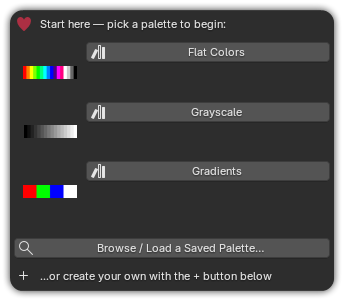
Three system presets ship with the add-on, each shown with real color swatches:
| Preset | Contents |
|---|---|
| Flat Colors | A set of solid colors — a ready primary/secondary palette. |
| Grayscale | A neutral value ramp from black to white. |
| Gradients | A sampler of gradient strips to build on. |
Open the preset picker (in the Gradient Tools panel) and click one to load it as a new palette at your default size. A preset is a color template, not a fixed-size asset, so it always adopts your preferred resolution.
Tip
Prefer to see only your own saved palettes? Turn off Show Built-in Presets in Preferences.
Your own presets
Save any palette as a reusable preset and pull it into any future project:
- Build a palette you like.
- Save as preset and give it a name.
- Later, open the preset picker — it's a searchable list, so just type to filter, even with hundreds of saved palettes.
User presets are stored on disk alongside the add-on's preset folder, so they persist across projects.
Universal import
Drop in a file and Gradient Tools detects the format automatically from its extension:
| Format | Extension | Notes |
|---|---|---|
| Gradient Tools JSON | .json |
The add-on's own round-trip format — keeps strip types, gradients and the saved texture size. |
| Adobe Swatch Exchange | .ase |
RGB / CMYK / Gray / Lab swatches. |
| GIMP Palette | .gpl |
Standard GIMP/Inkscape palettes. |
| PaintShop Pro / JASC | .pal |
JASC-PAL text palettes. |
| Plain text | .txt |
One color per line (hex or R G B). |
| Hex list | .hex |
Lines of #RRGGBB / RRGGBB / 0xRRGGBB. |
Imported palettes that carry no size of their own (everything except JSON) are created at your default size.
See File formats for the exact parsing rules.
Export to JSON
Use Export to write the active palette to a .json file. JSON is the only
round-trip format: re-importing it restores every strip, every gradient stop and the
exact texture size. Use it to back up, move palettes between machines, or share them with
teammates.
ASE/GPL/PAL/TXT/HEX are import-only
Those formats describe flat color lists, so Gradient Tools reads them but exports to its own JSON to preserve gradients and metadata.